Transforming Digital Art: A Comprehensive Guide to Using Stone Wall Photoshop Brushes
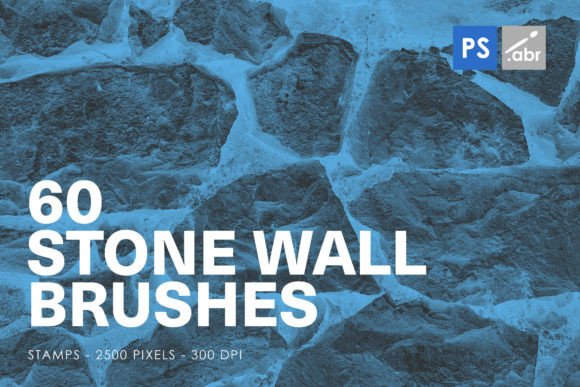
In the realm of digital design, texture is often the unsung hero that separates a flat, amateur-looking composition from a professional, immersive masterpiece. Whether you are a graphic designer crafting a rugged brand identity, a game developer building a realistic environment, or a hobbyist looking to add depth to your photo manipulations, the right tools can make all the difference. Among these tools, Stone Wall Photoshop Brushes have emerged as an essential asset for creators seeking authenticity and grit. This guide explores how high-resolution stamp brushes, specifically those featuring 60 distinct stone wall textures in 2500-pixel resolution, can elevate your creative workflow across various platforms, from Photoshop CS2 to the latest Creative Cloud versions.
The Power of Texture in Digital Design
Before diving into the specifics of brush sets, it is crucial to understand why texture matters. In the physical world, no surface is perfectly smooth. Even the most polished marble has microscopic imperfections, grain, and variation. When we create digital art without texture, images often appear sterile, artificial, and "too clean." Adding a stone wall texture introduces organic irregularity, grounding digital elements in a sense of reality.
For designers, this means creating more believable backgrounds. For photographers, it means enhancing mood through lighting and material simulation. For gamers, it means immersion. The introduction of specialized brush sets allows artists to apply these complex textures quickly and non-destructively, saving hours of manual painting while achieving superior results.
Why Choose Stamp Brushes Over Standard Paintbrushes?
While standard paintbrushes simulate the act of applying paint, stamp brushes operate differently. They function like digital stamps or decals. When you click or drag your cursor, the entire image of the texture is applied at once. This method offers several advantages:
- Speed: You can cover large areas with complex details in seconds rather than minutes.
- Consistency: The texture remains uniform in detail, preventing the muddy look that can occur with repetitive small brush strokes.
- Versatility: Because they are based on high-resolution images (such as the 2500-pixel size mentioned in premium packs), stamp brushes retain clarity even when scaled or manipulated.
Understanding the Asset: 60 Stone Wall Brushes
A typical high-quality set, such as the one containing 60 Stamp brushes inside, provides a vast array of options. These are not merely variations of gray squares; they represent different types of stone construction, erosion patterns, mortar styles, and weathering effects. With a resolution of 2500 pixels, these brushes are considered high-definition, ensuring that when you zoom in for close-up shots or print them at large sizes, the edges remain crisp and the internal details do not pixelate.
This variety is significant because "stone" is not a monolith. A medieval castle wall looks vastly different from a modern retaining wall or a rough-hewn quarry face. Having 60 distinct options allows a designer to match the specific architectural era or aesthetic of their project precisely.
Compatibility Across Versions
One of the primary concerns for users upgrading software is compatibility. Fortunately, these brush sets are designed for broad usability. They are compatible with Photoshop CS2 – CC All versions. This means whether you are using legacy software or the newest subscription-based Creative Cloud tools, the installation process and functionality remain consistent. This longevity ensures that your investment in digital assets does not become obsolete with every minor software update.
Practical Applications in Modern Creativity
How exactly do you use these 60 stone wall brushes? Their utility extends far beyond simple background creation. Here are some practical ways to integrate them into your workflow:
1. Photo Manipulation and Composite Art
In photo manipulation, blending disparate elements is key. If you place a digital object onto a photograph, it may look out of place due to differing lighting and surface qualities. By overlaying a stone wall texture using a stamp brush, you can unify the composite. Use the Multiply or Overlay blend modes to let the underlying image shine through while adding the gritty texture of the stone. This technique is particularly effective in creating surreal or dystopian scenes where architecture plays a central role.
2. Game Development and Visual Effects
For indie developers and VFX artists, time is money. Painting individual bricks for a game environment is tedious. Instead, using stamp brushes allows for rapid prototyping of level designs. You can quickly slap down textures to visualize how a corridor or dungeon floor will look. Furthermore, these brushes can be used for visual effects, such as simulating crumbling walls or ancient ruins in cinematic edits.
3. Text Fill and Typography
One of the most striking uses of texture brushes is filling text. Imagine a logo for a construction company, a heavy metal band, or a vintage beer brand. By typing out your text and then using a stone wall brush to fill the selection, you instantly give the typography weight and character. This technique transforms flat letters into tangible objects carved from rock, adding immediate visual impact.
4. Decorative Elements and UI Design
In web design and user interface (UI) creation, subtle textures can enhance usability and aesthetics. A button or a card background with a faint stone texture can provide a tactile feel to a digital interface, making it more engaging for the user. It adds depth without distracting from the content, adhering to modern design principles that favor subtlety and sophistication.
Best Practices for Using Stone Wall Brushes
To get the most out of your 60-stone-wall-brush pack, consider the following tips:
- Layer Blending Modes: Never just place the brush on a new layer. Experiment with blending modes like Soft Light, Difference, or Color Burn to integrate the texture naturally with your base colors.
- Opacity and Flow: Adjust the opacity of your brush tool. A lower opacity allows for gradual buildup of texture, which is useful for creating worn or faded areas.
- Transformation: Since the brushes are 2500 pixels, you can scale them down significantly for fine details or up for large surfaces. Always use Free Transform (Ctrl+T / Cmd+T) to rotate or skew the texture to match the perspective of your scene.
- Non-Destructive Editing: Apply your brushes on separate layers. This allows you to adjust, erase, or change the blend mode of the texture later without ruining your original artwork.
Common Misconceptions About Digital Textures
A frequent misunderstanding among beginners is that using a texture brush makes the work look "fake" if not done carefully. However, the issue usually lies not in the tool, but in the application. Real-world stone changes color due to moss, rain, and sun exposure. To avoid a flat look, vary the hue and saturation of your texture layer. Add noise or grain to break up the digital perfection. Remember, the goal is not to replicate reality perfectly, but to suggest it convincingly.
Another assumption is that high resolution always equals better performance. While 2500-pixel brushes are high quality, they can slow down older computers if used excessively on multiple layers. It is wise to rasterize layers once you are satisfied with the placement to reduce file size and improve rendering speed.
Conclusion: Enhancing Your Creative Toolkit
The inclusion of 60 Stone Wall Photoshop Brushes in your toolkit is more than just an addition of new files; it is an expansion of your creative vocabulary. These high-resolution stamp brushes offer a bridge between the digital and physical worlds, allowing you to infuse your projects with the weight, history, and realism of natural materials. Whether you are designing a poster, developing a game, or editing a photograph, these tools provide the versatility needed to meet diverse artistic demands.
By understanding how to apply these textures effectively—using proper blending modes, respecting resolution limits, and experimenting with scale—you can transform ordinary digital compositions into compelling visual narratives. As technology continues to evolve, the ability to manipulate texture realistically remains a fundamental skill for any serious creator. Embrace the grit, explore the variety of the 60 included brushes, and watch your designs gain a new dimension of depth and authenticity.