Ornamental Borders: A Practical Review of Vector Doodle Assets for Designers
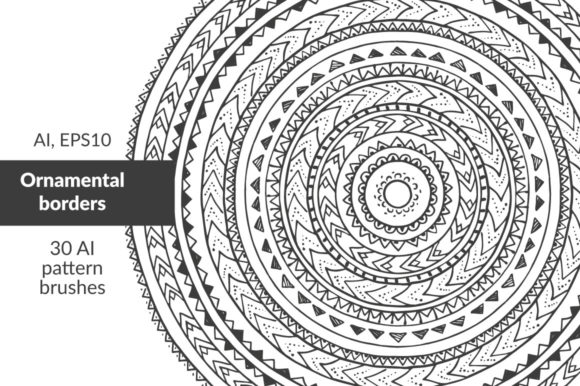
In the landscape of digital design, particularly within vector illustration, the demand for high-quality, reusable assets is constant. Among these, Ornamental Borders represent a specific category of resources that bridge the gap between rigid geometric precision and organic, hand-crafted aesthetics. This review examines a specific collection titled "ORNAMENTAL BORDERS VECTOR AI, EPS10 30 hand drawn doodle ornamental pattern brushes." For professionals and serious hobbyists alike, understanding the utility, flexibility, and technical implementation of such toolsets is essential for efficient workflow management.
The Core Concept: Hand-Drawn Precision in Vector Format
The primary value proposition of this asset pack lies in its hybrid nature. It combines the unpredictable charm of hand-drawn doodles with the mathematical consistency and scalability of vector graphics. Unlike raster-based brush sets that can pixelate or lose detail when scaled, these are native Adobe Illustrator (AI) and Encapsulated PostScript (EPS10) files. This ensures that every curve, line weight adjustment, and color fill remains crisp regardless of the output size.
The collection features thirty distinct pattern brushes. In vector terminology, a pattern brush allows a designer to define a specific graphic element that repeats along a path. By utilizing these brushes, users can transform simple lines into complex, decorative borders without manually placing individual elements. This distinction is crucial for projects requiring consistency across long stretches of design, such as book covers, website headers, or packaging dielines.
Technical Specifications and Flexibility
One of the most significant strengths of this particular set is its adaptability. The description notes that users can adjust size and color, which speaks to the non-destructive editing capabilities inherent in vector workflows. When applied to a path, these brushes inherit the properties of the underlying shape, allowing for rapid iteration on design concepts.
- Scalability: Because they are vector-based, the ornaments can be enlarged for billboard prints or reduced for business cards without quality loss.
- Color Customization: The ability to alter colors directly within the software environment means designers do not need to return to the source file to match brand palettes.
- Complexity Control: Users can combine multiple brushes to create intricate stripes, round shapes, or forms with rounded corners. This layering capability adds depth to otherwise flat designs.
This flexibility makes the resource particularly useful for creating mandalas or ethnic-style prints, where symmetry and repetition are key visual drivers. The "doodle" aspect suggests a slightly irregular, human touch, which can soften the sterile look of corporate templates while maintaining professional polish.
Practical Application and Workflow Integration
Understanding how to integrate these assets into a daily workflow is just as important as the assets themselves. The provided instructions outline a straightforward process for Adobe Illustrator users, but there are nuances that can enhance the experience.
- Installation: Open the AI or EPS file. Navigate to Menu - Windows - Brushes. The panel will display all available brushes from the file. Dragging them into your current document’s brush library is the standard method.
- Application: Use any drawing tool (Pen, Pencil, or Brush) to create a path. With the path selected, choose the desired brush from the panel.
- Refinement: Utilize the Brush Options dialog to tweak scale, spacing, and rotation. This step is critical for ensuring the ornament aligns perfectly with the intended layout.
For those working in other vector platforms like Affinity Designer or Inkscape, compatibility may vary. While EPS10 is a widely supported format, some proprietary brush behaviors in Illustrator may not translate perfectly. However, the core vector paths remain usable, often requiring manual recreation of the brush effect rather than direct import.
Use Cases and Target Audience
The versatility of Ornamental Borders makes it suitable for a broad spectrum of creative professionals. Below are specific scenarios where this asset pack demonstrates high utility:
Packaging Design
Small business owners and product designers often struggle with creating unique yet cost-effective packaging solutions. These brushes allow for the creation of custom border patterns that can wrap around boxes, bottles, or labels. The ability to generate complex shapes quickly reduces the time spent on repetitive detailing, allowing more focus on structural design.
Ethnic and Cultural Prints
Textile designers and fashion illustrators benefit significantly from the "ethnic style" potential mentioned in the asset description. The hand-drawn quality mimics traditional craft techniques, making it ideal for creating fabric prints, embroidery patterns, or cultural event promotional materials. The round shapes and corner variations facilitate the creation of seamless tiling patterns.
Digital Content Creation
Blogger, educators, and marketers frequently need eye-catching headers or dividers for articles and presentations. Instead of sourcing generic stock images that may lack uniqueness, these vector brushes offer a customizable alternative. They can be used to frame quotes, separate sections in a whitepaper, or add decorative elements to social media graphics.
Mandalas and Spiritual Art
For creators in the wellness and mindfulness niche, the ability to construct mandalas efficiently is valuable. By combining several brushes radially, artists can produce symmetrical, intricate designs that serve as focal points in posters, app interfaces, or print-on-demand products.
Evaluation of Quality and Reliability
From an objective standpoint, the reliability of vector brushes depends heavily on their construction. Well-made brushes have clean anchor points and consistent stroke weights. The "30 hand drawn" count suggests a curated selection rather than a massive, unorganized dump of assets. This curation typically results in higher usability, as designers spend less time filtering out low-quality or redundant options.
The inclusion of both AI and EPS10 formats is a strong indicator of professionalism. AI files are necessary for full feature access in Adobe Creative Cloud, while EPS10 ensures backward compatibility and broader software support. This dual-format approach mitigates the risk of version incompatibility, a common pain point for freelancers who may work with clients using older software versions.
Limitations and Considerations
While powerful, this resource is not a one-size-fits-all solution. Designers should be aware of certain limitations:
- Software Dependency: Full functionality requires Adobe Illustrator or compatible software. Users of basic design tools may find limited use.
- Learning Curve: Mastering brush modifiers (scale, spacing, rotation) takes practice. Beginners might initially struggle to achieve the desired aesthetic without experimentation.
- Style Specificity: The "doodle" style is distinct. If a project requires ultra-minimalist or hyper-realistic borders, these assets may not fit the visual language.
Furthermore, while the brushes are scalable, over-scaling a single instance can sometimes reveal gaps in the pattern if the original vector paths are not optimized for tiling. Careful inspection of the final output at 100% zoom is recommended before finalizing large-format prints.
Final Verdict on Utility
The "ORNAMENTAL BORDERS VECTOR AI, EPS10 30 hand drawn doodle ornamental pattern brushes" pack offers tangible value for designers seeking to inject personality into structured layouts. Its strength lies in the combination of artistic flair and technical precision. For professionals who value efficiency and customization, these brushes provide a robust toolkit for enhancing visual hierarchy and decorative appeal.
Whether you are designing ethnic-inspired textiles, crafting intricate mandalas, or simply adding a touch of elegance to a corporate report, this resource proves its worth through flexibility and ease of use. By leveraging the power of vector pattern brushes, designers can save time on repetitive tasks while maintaining a high standard of visual quality. The key to success lies in understanding the brush mechanics and experimenting with combinations to unlock the full potential of the thirty included styles.
For those willing to invest a small amount of time in learning the brush options, the return on investment is significant. The ability to generate complex, custom ornaments on the fly transforms a static asset into a dynamic component of the design process. In an industry where speed and originality are paramount, tools like Ornamental Borders provide a competitive edge by merging traditional artistry with modern digital efficiency.